✦ Shard Workshop / ✦ Recycle Pets
How to open
Type /pets sell.
Select an available shard exchange, open Workshop Guide for all recipes, or select Recycle a Pet. Choose a pet, inspect its reward, then Confirm Recycle. Back returns through the workshop views.
What each button does
✦ Shard Workshop / ✦ Recycle Pets
These are captured in-game menus. Your items, progress and timers can change.
In-game menu pictures
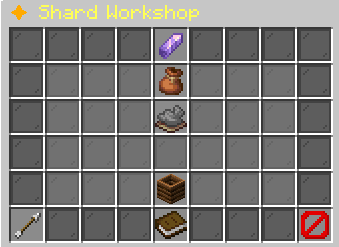
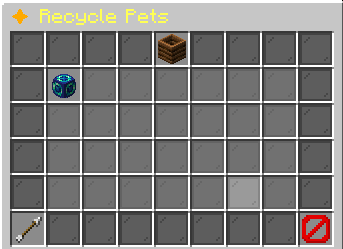
[in-game value] XP: +[in-game value]%
??? [UNCOMMON]Unlocks at Uncommon
??? [RARE]Unlocks at Rare
??? [EPIC]Unlocks at Epic
??? [LEGENDARY]Unlocks at Legendary
??? [MYTHIC]Unlocks at Mythic
Progress to Level [next level]: [progress]%[XP progress bar] [XP]/[XP required]
Recycle reward: [in-game value] [in-game value] ShardsRecycling permanently deletes this pet.Click to review before confirming.Example state · bracketed values depend on your game.BackReturn to the previous menu.CloseClose this menu.
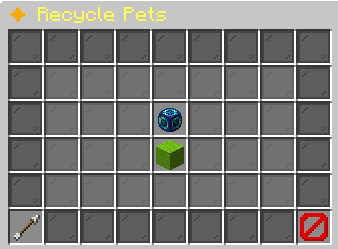
This cannot be undone.Example state · bracketed values depend on your game.Confirm RecyclePermanently deletes this pet.Receive: [in-game value] [in-game value] Shards.
Click to delete and receive shards.Example state · bracketed values depend on your game.BackReturn to the previous menu.CloseClose this menu.
Explore the button explanations
Menu picture
Illustrated control map. Item availability, labels and locked states can change in-game. Symbols identify actions; they are not exact item textures.
Choose a pictured button to read what it does. Use arrow keys to move between buttons. On a phone, scroll the picture sideways.
✦ Shard Workshop / ✦ Recycle Pets
Top row: Shard Workshop: Combine or split rarity shards.
Middle: Eligible pet to recycle: Select this pet and inspect its shard return. Shard balances: Read your carried rarity shards. Exchange, selected pet or recycle result: Read Exchange, selected pet or recycle result. Confirm Recycle: Permanently remove the selected pet for the shown shards. Get & Use Shards: Read shard uses and exchanges. Recycle a Pet: Choose a companion to permanently exchange for shards.
Bottom row: Back: Return to the previous menu. Previous Pet Page: Browse the previous page of pets. Open Workshop Guide / Return to Exchanges: Read Open Workshop Guide / Return to Exchanges. Next Pet Page: Browse the next page of pets. Close: Close this menu.
Pictures
[in-game value] XP: +[in-game value]%
??? [UNCOMMON]Unlocks at Uncommon
??? [RARE]Unlocks at Rare
??? [EPIC]Unlocks at Epic
??? [LEGENDARY]Unlocks at Legendary
??? [MYTHIC]Unlocks at Mythic
Progress to Level [next level]: [progress]%[XP progress bar] [XP]/[XP required]
Recycle reward: [in-game value] [in-game value] ShardsRecycling permanently deletes this pet.Click to review before confirming.Example state · bracketed values depend on your game.BackReturn to the previous menu.CloseClose this menu.
This cannot be undone.Example state · bracketed values depend on your game.Confirm RecyclePermanently deletes this pet.Receive: [in-game value] [in-game value] Shards.
Click to delete and receive shards.Example state · bracketed values depend on your game.BackReturn to the previous menu.CloseClose this menu.