✦ Raid Bosses
How to open
Type /pets raid.
Read current raid status and choose a boss from the catalog. Boss details show damage qualification, placement rewards and participation. Back returns from details to the boss list, then to the Pet Hub.
What each button does
✦ Raid Bosses
These are captured in-game menus. Your items, progress and timers can change.
In-game menu pictures
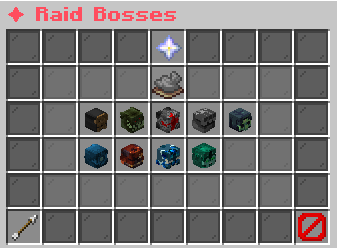
Damage, rewards, and participation inside.Click to view boss details.Example state · bracketed values depend on your game.Bladestorm Revenant[spawn countdown]Boss HP: [HP]Base damage: [damage]
Damage, rewards, and participation inside.Click to view boss details.Example state · bracketed values depend on your game.Forgefiend Vulkas[spawn countdown]Boss HP: [HP]Base damage: [damage]
Damage, rewards, and participation inside.Click to view boss details.Example state · bracketed values depend on your game.Ironfist Titan[spawn countdown]Boss HP: [HP]Base damage: [damage]
Damage, rewards, and participation inside.Click to view boss details.Example state · bracketed values depend on your game.Plaguebrewer Xantho[spawn countdown]Boss HP: [HP]Base damage: [damage]
Damage, rewards, and participation inside.Click to view boss details.Example state · bracketed values depend on your game.Skyveil Archon[spawn countdown]Boss HP: [HP]Base damage: [damage]
Damage, rewards, and participation inside.Click to view boss details.Example state · bracketed values depend on your game.Stonelord Grimm[spawn countdown]Boss HP: [HP]Base damage: [damage]
Damage, rewards, and participation inside.Click to view boss details.Example state · bracketed values depend on your game.Tide Sovereign[spawn countdown]Boss HP: [HP]Base damage: [damage]
Damage, rewards, and participation inside.Click to view boss details.Example state · bracketed values depend on your game.Verdant Colossus[spawn countdown]Boss HP: [HP]Base damage: [damage]
Damage, rewards, and participation inside.Click to view boss details.Example state · bracketed values depend on your game.BackClick to return to Pet Hub.Example state · bracketed values depend on your game.CloseClose this menu.
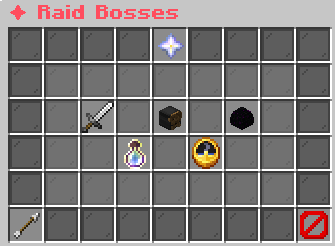
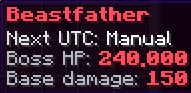
Deal 1% of boss HP to qualify.Minimum contribution: [in-game value]Higher damage earns higher placement.Example state · bracketed values depend on your game.Beastfather[spawn countdown]Boss HP: [HP]Base damage: [damage]Example state · bracketed values depend on your game.Placement Rewards1st Place1x [Family] EggRarity rolls when the egg hatches.Hatch ceiling: Epic
2nd & 3rd PlaceOne reward type, 25% chance each:Rarity shard, money, blocks, or egg.Egg: random base family; Rare ceiling.Example state · bracketed values depend on your game.Participation & Weekly BonusParticipationDeal at least [minimum damage] damage.Reward: 1x random-family Common egg.Top contributors can receive this too.
Weekly First DefeatTop [rewarded places] receive bonus boss-family eggs.Only the first defeat of this bosseach week awards this bonus.Eligible players must be online for payout.Bonus egg rarity rolls at hatch.Example state · bracketed values depend on your game.Location & ScheduleWorld: [in-game value]Location: [in-game value], [in-game value], [in-game value][in-game value]Watch chat for spawn announcements.Example state · bracketed values depend on your game.BackClick to return to boss list.Example state · bracketed values depend on your game.CloseClose this menu.
View the related in-game pictures and tooltips (4)
Related pictures and tooltips
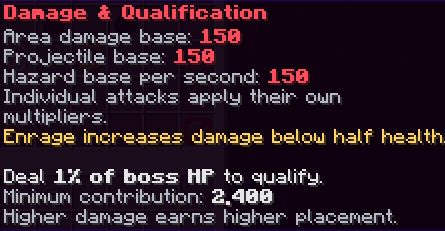
Deal 1% of boss HP to qualify.Minimum contribution: [in-game value]Higher damage earns higher placement.Example state · bracketed values depend on your game.
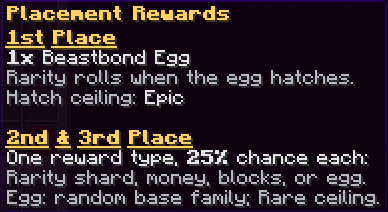
2nd & 3rd PlaceOne reward type, 25% chance each:Rarity shard, money, blocks, or egg.Egg: random base family; Rare ceiling.Example state · bracketed values depend on your game.
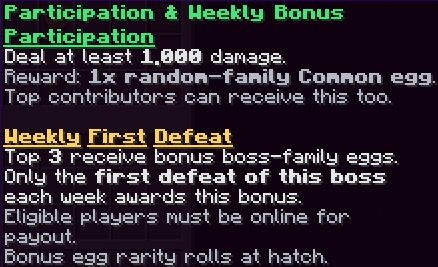
Weekly First DefeatTop [rewarded places] receive bonus boss-family eggs.Only the first defeat of this bosseach week awards this bonus.Eligible players must be online for payout.Bonus egg rarity rolls at hatch.Example state · bracketed values depend on your game.
Explore the button explanations
1. Choose a boss
Boss list example. The status card changes when raids are paused, idle or active.
Choose a pictured button to read what it does. Use arrow keys to move between buttons. On a phone, scroll the picture sideways.
✦ Raid Bosses
2. Read boss details
Example: Beastfather selected. These information cards explain the encounter; they do not teleport you.
Choose a pictured button to read what it does. Use arrow keys to move between buttons. On a phone, scroll the picture sideways.
✦ Raid Bosses
Top row: ✦ Raid Bosses: Read Raid Bosses.
Middle: Raid Bosses: OFF: Read Raid Bosses: OFF. Damage & Qualification: Read the damage needed for ranked and participation rewards. Raid boss: Read this boss’s encounter summary. Menu information: Read Menu information. Placement Rewards: Read the ranked reward categories. Participation & Weekly Bonus: Read the separate participation and weekly rewards. Location & Schedule: Read available encounter information.
Bottom row: Back: Return to the previous menu. Close: Close this menu.
Pictures
Damage, rewards, and participation inside.Click to view boss details.Example state · bracketed values depend on your game.Bladestorm Revenant[spawn countdown]Boss HP: [HP]Base damage: [damage]
Damage, rewards, and participation inside.Click to view boss details.Example state · bracketed values depend on your game.Forgefiend Vulkas[spawn countdown]Boss HP: [HP]Base damage: [damage]
Damage, rewards, and participation inside.Click to view boss details.Example state · bracketed values depend on your game.Ironfist Titan[spawn countdown]Boss HP: [HP]Base damage: [damage]
Damage, rewards, and participation inside.Click to view boss details.Example state · bracketed values depend on your game.Plaguebrewer Xantho[spawn countdown]Boss HP: [HP]Base damage: [damage]
Damage, rewards, and participation inside.Click to view boss details.Example state · bracketed values depend on your game.Skyveil Archon[spawn countdown]Boss HP: [HP]Base damage: [damage]
Damage, rewards, and participation inside.Click to view boss details.Example state · bracketed values depend on your game.Stonelord Grimm[spawn countdown]Boss HP: [HP]Base damage: [damage]
Damage, rewards, and participation inside.Click to view boss details.Example state · bracketed values depend on your game.Tide Sovereign[spawn countdown]Boss HP: [HP]Base damage: [damage]
Damage, rewards, and participation inside.Click to view boss details.Example state · bracketed values depend on your game.Verdant Colossus[spawn countdown]Boss HP: [HP]Base damage: [damage]
Damage, rewards, and participation inside.Click to view boss details.Example state · bracketed values depend on your game.BackClick to return to Pet Hub.Example state · bracketed values depend on your game.CloseClose this menu.
Deal 1% of boss HP to qualify.Minimum contribution: [in-game value]Higher damage earns higher placement.Example state · bracketed values depend on your game.Beastfather[spawn countdown]Boss HP: [HP]Base damage: [damage]Example state · bracketed values depend on your game.Placement Rewards1st Place1x [Family] EggRarity rolls when the egg hatches.Hatch ceiling: Epic
2nd & 3rd PlaceOne reward type, 25% chance each:Rarity shard, money, blocks, or egg.Egg: random base family; Rare ceiling.Example state · bracketed values depend on your game.Participation & Weekly BonusParticipationDeal at least [minimum damage] damage.Reward: 1x random-family Common egg.Top contributors can receive this too.
Weekly First DefeatTop [rewarded places] receive bonus boss-family eggs.Only the first defeat of this bosseach week awards this bonus.Eligible players must be online for payout.Bonus egg rarity rolls at hatch.Example state · bracketed values depend on your game.Location & ScheduleWorld: [in-game value]Location: [in-game value], [in-game value], [in-game value][in-game value]Watch chat for spawn announcements.Example state · bracketed values depend on your game.BackClick to return to boss list.Example state · bracketed values depend on your game.CloseClose this menu.
Deal 1% of boss HP to qualify.Minimum contribution: [in-game value]Higher damage earns higher placement.Example state · bracketed values depend on your game.
2nd & 3rd PlaceOne reward type, 25% chance each:Rarity shard, money, blocks, or egg.Egg: random base family; Rare ceiling.Example state · bracketed values depend on your game.
Weekly First DefeatTop [rewarded places] receive bonus boss-family eggs.Only the first defeat of this bosseach week awards this bonus.Eligible players must be online for payout.Bonus egg rarity rolls at hatch.Example state · bracketed values depend on your game.