Pets & Family Guide
How to open
Type /pets families.
Switch Owned Pets and All Families. Select a pet or family to read eligible biomes. Your Incubators opens the placed-incubator list. Back returns from biomes to the previous tab, then to the Pet Hub.
What each button does
Pets & Family Guide
These are captured in-game menus. Your items, progress and timers can change.
In-game menu pictures
Click to view incubation habitats.Example state · bracketed values depend on your game.BackReturn to previous menu✔ Owned PetsCurrently selected.All FamiliesClick to open.Page 1 / [in-game value]Example state · bracketed values depend on your game.Your IncubatorsView your placed nursery locations.Click to open.How to Incubate1. Find a listed family biome.2. Use an owned or trusted claim.3. Place a signed incubator there.4. Right-click it to insert your egg.
To stack: hold another incubator.Right-click the top face while holding an incubator.Maximum: three blocks in the same claim.One egg slot per stacked block.CloseClose this menu
Explore the button explanations
Menu picture
Illustrated control map. Item availability, labels and locked states can change in-game. Symbols identify actions; they are not exact item textures.
Choose a pictured button to read what it does. Use arrow keys to move between buttons. On a phone, scroll the picture sideways.
Pets & Family Guide
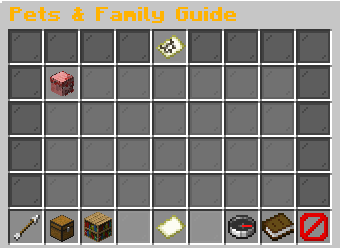
Top row: Pets & Family Guide: Browse pets, families and nursery habitats.
Middle: Owned pet, family or eligible biome: Read Owned pet, family or eligible biome. Permission Required: Read Permission Required.
Bottom row: Back: Return to the previous menu. Owned Pets: Browse your pets. All Families: Browse every family. Previous Page: Show the previous page. Page: Read the current page. Next Page: Show the next page. Your Incubators: Read your placed incubators. How to Incubate: Read the egg and nursery instructions. Close: Close this menu.
Pictures
Click to view incubation habitats.Example state · bracketed values depend on your game.BackReturn to previous menu✔ Owned PetsCurrently selected.All FamiliesClick to open.Page 1 / [in-game value]Example state · bracketed values depend on your game.Your IncubatorsView your placed nursery locations.Click to open.How to Incubate1. Find a listed family biome.2. Use an owned or trusted claim.3. Place a signed incubator there.4. Right-click it to insert your egg.
To stack: hold another incubator.Right-click the top face while holding an incubator.Maximum: three blocks in the same claim.One egg slot per stacked block.CloseClose this menu