✦ Pet Details
How to open
Open /pets > Your Pets. Shift-right-click a pet to open Pet Details.
Read growth, bonuses, family resource, Bond, rarity progress, Mastery and ability slots. Choose Talents, Rename Pet, Change Skin, Manage Pet Item or Withdraw Pet as Item. The rarity action changes with the selected pet tier.
What each button does
✦ Pet Details
These are captured in-game menus. Your items, progress and timers can change.
In-game menu pictures
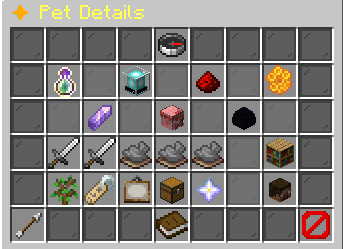
Breeding identityGender: [in-game value]Generation: [generation]Lifetime breeds used: [breeds] / 3Example state · bracketed values depend on your game.Pet BonusesBase bonuses at this level and rarity:[in-game value] XP: +[in-game value]%[in-game value] duration: +[in-game value]s
Activate this pet to receive its bonuses.Example state · bracketed values depend on your game.Family ResourceNo family resource is configured for this pet.Keep this pet active to build its resource.Each ability lists its cost or threshold.Example state · bracketed values depend on your game.BondBond: [in-game value] / 100Relationship: [in-game value]Keep this pet active while playing to build bond.Bond can decay while the pet is inactive.Example state · bracketed values depend on your game.Next Rarity RequirementsNext step: shard upgradeNext rarity: [Next rarity]Requires matching shards, coins, and time.The upgrade menu shows exact costs before confirming.Shard upgrades stop at Epic.Use Open Rarity Upgrade in the action row.Example state · bracketed values depend on your game.[Pet name and gender]Rarity: [Rarity]Level: [level] / 100Family: [Family]Status: InactiveFavorite: NoSkin: [Skin]Nickname: [in-game value]Example state · bracketed values depend on your game.Mastery RecordStatus: Not recordedUnlock requirement: Mythic at level 100.Mastery currently records ownership only.It adds no passive stat bonus.Example state · bracketed values depend on your game.Uncommon Slot: [Stored ability name]Effect: [Stored ability effect]
Trigger: [Stored ability activation]Requires: [Stored ability requirements]Chance: [Stored trigger chance]Cooldown: [Stored cooldown]Example state · bracketed values depend on your game.Rare Slot: [Stored ability name]Effect: [Stored ability effect]
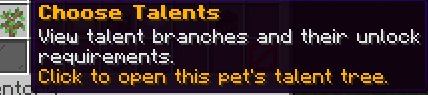
Trigger: [Stored ability activation]Requires: [Stored ability requirements]Chance: [Stored trigger chance]Cooldown: [Stored cooldown]Example state · bracketed values depend on your game.Epic LockedRequires Epic pet rarity.Reach that rarity to unlock this ability slot.Example state · bracketed values depend on your game.Legendary LockedRequires Legendary pet rarity.Reach that rarity to unlock this ability slot.Example state · bracketed values depend on your game.Mythic LockedRequires Mythic pet rarity.Reach that rarity to unlock this ability slot.Example state · bracketed values depend on your game.Open Ability CodexSlots run from Uncommon to Mythic.One ability occupies each rarity slot.Hover an ability to read its exact effect.Click to browse all abilities.Choose TalentsView talent branches and their unlock requirements.Click to open this pet's talent tree.Rename PetEnter a nickname in chat.Maximum length: [in-game value] characters.Type clear to remove the nickname.Click to enter a name.Example state · bracketed values depend on your game.Change SkinCurrent skin: [Skin]Browse skins and apply an unlocked look.Click to open this pet's skins.Example state · bracketed values depend on your game.Manage Pet ItemEquipped: [Equipped item]Attach or remove an item from this pet.Click to manage equipment.Example state · bracketed values depend on your game.Open Rarity UpgradeChoose this pet in the upgrade menu.Review its shard cost, coins, and wait.Shard upgrades stop at Epic.Click to open rarity upgrades.Withdraw Pet as ItemConvert this pet into a tradeable head.Saves the head to your Pet Delivery.The pet leaves your collection until redeemed.Click to withdraw this pet.BackReturn to the previous menu.How to Read This MenuInformationTop cards explain growth, bonuses, resource, and bond.Your pet is in the centre.AbilitiesThe five slots are ordered by rarity.Each tooltip explains effect, trigger, cost, and timing.ActionsThe row below the abilities contains pet actions.Only the next relevant rarity route appears.CloseClose this menu.
View the related in-game pictures and tooltips (1)
Related pictures and tooltips
Explore the button explanations
Menu picture
Illustrated control map. Item availability, labels and locked states can change in-game. Symbols identify actions; they are not exact item textures.
Choose a pictured button to read what it does. Use arrow keys to move between buttons. On a phone, scroll the picture sideways.
✦ Pet Details
Top row: Pet Details: Read Pet Details.
Middle: Growth & Breeding: Read this pet’s growth, gender and remaining breeding uses. Pet Bonuses: Read family skill and Super Ability support. Family Resource: Read the active companion’s family meter. Bond: Read this pet’s relationship score and tier. Next Rarity Requirements: Check the requirements for this pet’s next rarity. Selected pet: Read Selected pet. Mastery Record: Read Mastery Record. Pet ability: Read this pet’s ability. Open Ability Codex: Browse ability descriptions. Choose Talents: Open the pet’s permanent branch choices. Rename Pet: Enter a nickname for this pet. Change Skin: Choose an unlocked cosmetic appearance. Manage Pet Item: Read this pet’s attached item. Next rarity action: Read Next rarity action. Withdraw Pet as Item: Remove the pet from your collection and send its physical head to Pet Delivery.
Bottom row: Back: Return to the previous menu. How to Read This Menu: Read How to Read This Menu. Close: Close this menu.
Pictures
Breeding identityGender: [in-game value]Generation: [generation]Lifetime breeds used: [breeds] / 3Example state · bracketed values depend on your game.Pet BonusesBase bonuses at this level and rarity:[in-game value] XP: +[in-game value]%[in-game value] duration: +[in-game value]s
Activate this pet to receive its bonuses.Example state · bracketed values depend on your game.Family ResourceNo family resource is configured for this pet.Keep this pet active to build its resource.Each ability lists its cost or threshold.Example state · bracketed values depend on your game.BondBond: [in-game value] / 100Relationship: [in-game value]Keep this pet active while playing to build bond.Bond can decay while the pet is inactive.Example state · bracketed values depend on your game.Next Rarity RequirementsNext step: shard upgradeNext rarity: [Next rarity]Requires matching shards, coins, and time.The upgrade menu shows exact costs before confirming.Shard upgrades stop at Epic.Use Open Rarity Upgrade in the action row.Example state · bracketed values depend on your game.[Pet name and gender]Rarity: [Rarity]Level: [level] / 100Family: [Family]Status: InactiveFavorite: NoSkin: [Skin]Nickname: [in-game value]Example state · bracketed values depend on your game.Mastery RecordStatus: Not recordedUnlock requirement: Mythic at level 100.Mastery currently records ownership only.It adds no passive stat bonus.Example state · bracketed values depend on your game.Uncommon Slot: [Stored ability name]Effect: [Stored ability effect]
Trigger: [Stored ability activation]Requires: [Stored ability requirements]Chance: [Stored trigger chance]Cooldown: [Stored cooldown]Example state · bracketed values depend on your game.Rare Slot: [Stored ability name]Effect: [Stored ability effect]
Trigger: [Stored ability activation]Requires: [Stored ability requirements]Chance: [Stored trigger chance]Cooldown: [Stored cooldown]Example state · bracketed values depend on your game.Epic LockedRequires Epic pet rarity.Reach that rarity to unlock this ability slot.Example state · bracketed values depend on your game.Legendary LockedRequires Legendary pet rarity.Reach that rarity to unlock this ability slot.Example state · bracketed values depend on your game.Mythic LockedRequires Mythic pet rarity.Reach that rarity to unlock this ability slot.Example state · bracketed values depend on your game.Open Ability CodexSlots run from Uncommon to Mythic.One ability occupies each rarity slot.Hover an ability to read its exact effect.Click to browse all abilities.Choose TalentsView talent branches and their unlock requirements.Click to open this pet's talent tree.Rename PetEnter a nickname in chat.Maximum length: [in-game value] characters.Type clear to remove the nickname.Click to enter a name.Example state · bracketed values depend on your game.Change SkinCurrent skin: [Skin]Browse skins and apply an unlocked look.Click to open this pet's skins.Example state · bracketed values depend on your game.Manage Pet ItemEquipped: [Equipped item]Attach or remove an item from this pet.Click to manage equipment.Example state · bracketed values depend on your game.Open Rarity UpgradeChoose this pet in the upgrade menu.Review its shard cost, coins, and wait.Shard upgrades stop at Epic.Click to open rarity upgrades.Withdraw Pet as ItemConvert this pet into a tradeable head.Saves the head to your Pet Delivery.The pet leaves your collection until redeemed.Click to withdraw this pet.BackReturn to the previous menu.How to Read This MenuInformationTop cards explain growth, bonuses, resource, and bond.Your pet is in the centre.AbilitiesThe five slots are ordered by rarity.Each tooltip explains effect, trigger, cost, and timing.ActionsThe row below the abilities contains pet actions.Only the next relevant rarity route appears.CloseClose this menu.