Pets
How to open
Type /pets pets.
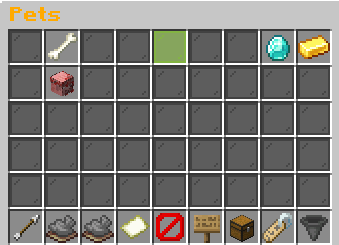
Left click an inactive pet to activate it. Click the active pet to deactivate it. Shift-left toggles favorites. Right click withdraws a pet. Middle click or shift-right opens Pet Details. Footer controls page, visibility, items, rarity filter and sorting.
What each button does
Pets
These are captured in-game menus. Your items, progress and timers can change.
In-game menu pictures
Level up your pets faster by gainingXP in their favourite skill!
Active pet: 1/1Summoned: None
Left-click a pet to summon it!Example state · bracketed values depend on your game.Active PetNo pet is currently summoned.
Left-click any pet below to summon it.FavoritesView your favorite pets.Click to open.Exp SharingLet your pets gain Pet Exp withoutthem being actively deployed!
Click to view![Lvl level] [Pet name and gender][Pet type]Family: [Family]Family Type: [Family type]Gender: [Gender] | Gen [generation]Breeds: [breeds]/3
[in-game value] XP: +[in-game value]%
??? [UNCOMMON]Unlocks at Uncommon
??? [RARE]Unlocks at Rare
??? [EPIC]Unlocks at Epic
??? [LEGENDARY]Unlocks at Legendary
??? [MYTHIC]Unlocks at Mythic
Progress to Level [next level]: [progress]%[XP progress bar] [XP]/[XP required]
Example state · bracketed values depend on your game.BackReturn to the Pet Hub.Previous PagePage 1/[pages]No previous page.Example state · bracketed values depend on your game.Next PagePage 1/[pages]No next page.Example state · bracketed values depend on your game.Page 1 / [pages]Showing [in-game value] pet(s).Filter: AllSort: Level (High to Low)Example state · bracketed values depend on your game.CloseClose this menu.Pet visibility
▶ Show all pets Hide all pets Only your pet
Pet name tags: Enabled
Left-click to switch visibility!Example state · bracketed values depend on your game.Pet ItemsAttach items to your pets.Click to open.FilterCurrent: All
Click to cycle rarity!Shift-click to toggle favorites only!Example state · bracketed values depend on your game.Sort
Rarity Alphabetical Pet Exp Skill Favorites Lowest Level Lowest Rarity
Right-Click to go backwards!Click to switch sort!
Explore the button explanations
Menu picture
Illustrated control map. Item availability, labels and locked states can change in-game. Symbols identify actions; they are not exact item textures.
Choose a pictured button to read what it does. Use arrow keys to move between buttons. On a phone, scroll the picture sideways.
Pets
Top row: Pets: Read Pets. Active Pet / your summoned pet: Click to desummon. Use a details click to inspect the companion. Favorites: Open your marked companions. Exp Sharing: Read Exp Sharing.
Middle: Your inactive pet: Left-click to activate, shift-left-click to favorite, or shift-right-click for Pet Details. Right-click withdraws it.
Bottom row: Back: Return to the previous menu. Previous Page: Show the previous page. Next Page: Show the next page. Page: Read the current page. Close: Close this menu. Pet visibility: Read Pet visibility. Pet Items: Browse permanent attachments. Filter: Cycle rarities. Shift-click to show favorites only. Sort: Cycle sorting. Right-click to go backward.
Pictures
Level up your pets faster by gainingXP in their favourite skill!
Active pet: 1/1Summoned: None
Left-click a pet to summon it!Example state · bracketed values depend on your game.Active PetNo pet is currently summoned.
Left-click any pet below to summon it.FavoritesView your favorite pets.Click to open.Exp SharingLet your pets gain Pet Exp withoutthem being actively deployed!
Click to view![Lvl level] [Pet name and gender][Pet type]Family: [Family]Family Type: [Family type]Gender: [Gender] | Gen [generation]Breeds: [breeds]/3
[in-game value] XP: +[in-game value]%
??? [UNCOMMON]Unlocks at Uncommon
??? [RARE]Unlocks at Rare
??? [EPIC]Unlocks at Epic
??? [LEGENDARY]Unlocks at Legendary
??? [MYTHIC]Unlocks at Mythic
Progress to Level [next level]: [progress]%[XP progress bar] [XP]/[XP required]
Example state · bracketed values depend on your game.BackReturn to the Pet Hub.Previous PagePage 1/[pages]No previous page.Example state · bracketed values depend on your game.Next PagePage 1/[pages]No next page.Example state · bracketed values depend on your game.Page 1 / [pages]Showing [in-game value] pet(s).Filter: AllSort: Level (High to Low)Example state · bracketed values depend on your game.CloseClose this menu.Pet visibility
▶ Show all pets Hide all pets Only your pet
Pet name tags: Enabled
Left-click to switch visibility!Example state · bracketed values depend on your game.Pet ItemsAttach items to your pets.Click to open.FilterCurrent: All
Click to cycle rarity!Shift-click to toggle favorites only!Example state · bracketed values depend on your game.Sort
Rarity Alphabetical Pet Exp Skill Favorites Lowest Level Lowest Rarity
Right-Click to go backwards!Click to switch sort!