Egg Hatchery
Recognize your egg
These are the egg item pictures used in-game. Read the carried egg’s instructions to choose its opening route.
- Terravore EggPet EggFamily: TerravoreRarity: Rolled at hatchIncubates in: Windswept hills, Stony peaksHatch time: 10m 0sPlace in an incubator within a matching biome.Terravore EggTerravore
Read egg lore
Egg description
Stone remembers what it was asked to become.
Signed family egg
Terravore Egg
Pet EggFamily: TerravoreRarity: Rolled at hatchIncubates in: Windswept hills, Stony peaksHatch time: 10m 0sPlace in an incubator within a matching biome. - Verdant EggPet EggFamily: VerdantRarity: Rolled at hatchIncubates in: Flower forest, MeadowHatch time: 10m 0sPlace in an incubator within a matching biome.Verdant EggVerdant
Read egg lore
Egg description
It only needs soil and a reason.
Signed family egg
Verdant Egg
Pet EggFamily: VerdantRarity: Rolled at hatchIncubates in: Flower forest, MeadowHatch time: 10m 0sPlace in an incubator within a matching biome. - Mystery EggSomething is moving inside. It is not saying what.Mystery EggMystery family pool
Read egg lore
Egg description
Something is moving inside. It is not saying what.
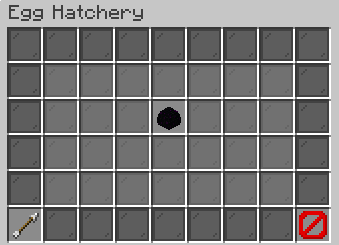
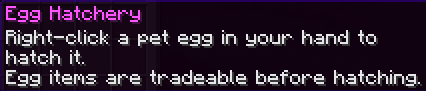
Egg Hatchery is a help screen. Signed family eggs go into a physical Incubator. Older hand-hatched eggs follow their right-click instructions.
How to open
Type /pets eggs.
Read the hatchery instructions and return to the Pet Hub. This screen does not hatch eggs or offer a legacy egg purchase.
What each button does
Egg Hatchery
These are captured in-game menus. Your items, progress and timers can change.
In-game menu pictures
View the related in-game pictures and tooltips (1)
Related pictures and tooltips
Explore the button explanations
Menu picture
Illustrated control map. Item availability, labels and locked states can change in-game. Symbols identify actions; they are not exact item textures.
Choose a pictured button to read what it does. Use arrow keys to move between buttons. On a phone, scroll the picture sideways.
Egg Hatchery
Middle: Egg Hatchery: Read egg-opening instructions.
Bottom row: Back: Return to the previous menu. Close: Close this menu.
Pictures