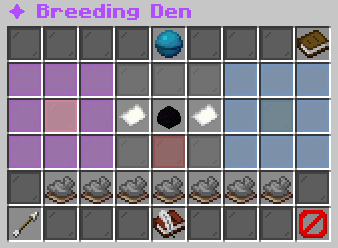
Choose a female and male pet, inspect the egg and requirement checks, then open the breeding confirmation. Breeding History opens your past results.
What each button does
✦ Breeding Den
These are captured in-game menus. Your items, progress and timers can change.
In-game menu pictures
✦ Breeding Den✦ Breeding Den1. Click the left slot: choose a female.1. Click the left slot: choose a female.2. Click the right slot: choose a male.2. Click the right slot: choose a male.3. Review the egg, then confirm below.3. Review the egg, then confirm below.Select pets from your collection; do not drag items.Select pets from your collection; do not drag items.How Breeding WorksHow Breeding WorksSame family: one egg, with a twin chance.Same family: one egg, with a twin chance.Different families: one hybrid-family egg.Different families: one hybrid-family egg.Parents remain yours after breeding.Parents remain yours after breeding.Each parent spends one lifetime breed.Each parent spends one lifetime breed.Cooldown per parent: 12h 0m.Cooldown per parent: 12h 0m.Minimum parent level: 1.Minimum parent level: 1.Place the egg in a matching-biome incubator.Place the egg in a matching-biome incubator.Rarity rolls when the egg hatches.Rarity rolls when the egg hatches.Step 1: Select Mother ♀Step 1: Select Mother ♀No mother selected.No mother selected.Choose one idle female pet.Choose one idle female pet.Minimum level: 1.Minimum level: 1.Click to browse your pets.Click to browse your pets.→ Egg from both parents→ Egg from both parentsEgg PreviewEgg PreviewSelect both parents to preview.Select both parents to preview.← Egg from both parents← Egg from both parentsStep 2: Select Father ♂Step 2: Select Father ♂No father selected.No father selected.Choose one idle male pet.Choose one idle male pet.Minimum level: 1.Minimum level: 1.Click to browse your pets.Click to browse your pets.Step 3: Cannot Breed YetStep 3: Cannot Breed Yet✘ [in-game value]✘ [in-game value]Use the highlighted parent slots above.Use the highlighted parent slots above.Click to recheck requirements.Click to recheck requirements.Example state · bracketed values depend on your game.✘ Parents Selected✘ Parents Selected✘ Choose both parent slots.✘ Choose both parent slots.Example state · bracketed values depend on your game.✘ Opposite Genders✘ Opposite Genders✘ One female and one male are required.✘ One female and one male are required.Example state · bracketed values depend on your game.✘ Pets Desummoned✘ Pets Desummoned✘ Desummon active parents.✘ Desummon active parents.Example state · bracketed values depend on your game.✘ Breed Charges✘ Breed Charges✘ Remaining: mother [in-game value], father [in-game value]. Each needs one.✘ Remaining: mother [in-game value], father [in-game value]. Each needs one.Example state · bracketed values depend on your game.✘ Cooldown Ready✘ Cooldown Ready✘ Mother: [in-game value]. Father: [in-game value].✘ Mother: [in-game value]. Father: [in-game value].Example state · bracketed values depend on your game.✘ Level Requirement✘ Level Requirement✘ Minimum level 1.✘ Minimum level 1.Example state · bracketed values depend on your game.✘ Operation Locks✘ Operation Locks✘ Finish other pet operations.✘ Finish other pet operations.Example state · bracketed values depend on your game.BackBackReturn to previous menuReturn to previous menuBreeding HistoryBreeding HistoryReview your latest breeding results.Review your latest breeding results.Click to open.Click to open.CloseCloseClose this menuClose this menu
Breeding Den: parent selections, egg preview, requirements and history controlsHover an item, focus it with the keyboard, or tap for its in-game tooltip. Bracketed values vary with your game.
Explore the button explanations
Menu picture
Illustrated control map. Item availability, labels and locked states can change in-game. Symbols identify actions; they are not exact item textures.
Choose a pictured button to read what it does. Use arrow keys to move between buttons. On a phone, scroll the picture sideways.
✦ Breeding Den
✦ Breeding Den — Read Breeding Den.
All button descriptions (12)
✦ Breeding Den: Read Breeding Den.
How Breeding Works: Read How Breeding Works.
Step 1: Select Mother ♀: Choose an eligible female pet. Other states: Step.
→ Egg from both parents: Read → Egg from both parents.
Egg Preview: Read the egg family and parent pairing.
← Egg from both parents: Read ← Egg from both parents.
Step 2: Select Father ♂: Choose an eligible male pet. Other states: Step.
Step 3: Cannot Breed Yet: Check the unmet parent requirements before confirming. Other states: Step 3: Review Breeding.
✔: Read ✔.
Back: Return to the previous menu.
Breeding History: Read your past pairings and eggs.
Close: Close this menu.
Top row: ✦ Breeding Den: Read Breeding Den. How Breeding Works: Read How Breeding Works.
Middle: Step 1: Select Mother ♀: Choose an eligible female pet. → Egg from both parents: Read → Egg from both parents. Egg Preview: Read the egg family and parent pairing. ← Egg from both parents: Read ← Egg from both parents. Step 2: Select Father ♂: Choose an eligible male pet. Step 3: Cannot Breed Yet: Check the unmet parent requirements before confirming. ✔: Read ✔.
Bottom row: Back: Return to the previous menu. Breeding History: Read your past pairings and eggs. Close: Close this menu.
✦ Breeding Den✦ Breeding Den1. Click the left slot: choose a female.1. Click the left slot: choose a female.2. Click the right slot: choose a male.2. Click the right slot: choose a male.3. Review the egg, then confirm below.3. Review the egg, then confirm below.Select pets from your collection; do not drag items.Select pets from your collection; do not drag items.How Breeding WorksHow Breeding WorksSame family: one egg, with a twin chance.Same family: one egg, with a twin chance.Different families: one hybrid-family egg.Different families: one hybrid-family egg.Parents remain yours after breeding.Parents remain yours after breeding.Each parent spends one lifetime breed.Each parent spends one lifetime breed.Cooldown per parent: 12h 0m.Cooldown per parent: 12h 0m.Minimum parent level: 1.Minimum parent level: 1.Place the egg in a matching-biome incubator.Place the egg in a matching-biome incubator.Rarity rolls when the egg hatches.Rarity rolls when the egg hatches.Step 1: Select Mother ♀Step 1: Select Mother ♀No mother selected.No mother selected.Choose one idle female pet.Choose one idle female pet.Minimum level: 1.Minimum level: 1.Click to browse your pets.Click to browse your pets.→ Egg from both parents→ Egg from both parentsEgg PreviewEgg PreviewSelect both parents to preview.Select both parents to preview.← Egg from both parents← Egg from both parentsStep 2: Select Father ♂Step 2: Select Father ♂No father selected.No father selected.Choose one idle male pet.Choose one idle male pet.Minimum level: 1.Minimum level: 1.Click to browse your pets.Click to browse your pets.Step 3: Cannot Breed YetStep 3: Cannot Breed Yet✘ [in-game value]✘ [in-game value]Use the highlighted parent slots above.Use the highlighted parent slots above.Click to recheck requirements.Click to recheck requirements.Example state · bracketed values depend on your game.✘ Parents Selected✘ Parents Selected✘ Choose both parent slots.✘ Choose both parent slots.Example state · bracketed values depend on your game.✘ Opposite Genders✘ Opposite Genders✘ One female and one male are required.✘ One female and one male are required.Example state · bracketed values depend on your game.✘ Pets Desummoned✘ Pets Desummoned✘ Desummon active parents.✘ Desummon active parents.Example state · bracketed values depend on your game.✘ Breed Charges✘ Breed Charges✘ Remaining: mother [in-game value], father [in-game value]. Each needs one.✘ Remaining: mother [in-game value], father [in-game value]. Each needs one.Example state · bracketed values depend on your game.✘ Cooldown Ready✘ Cooldown Ready✘ Mother: [in-game value]. Father: [in-game value].✘ Mother: [in-game value]. Father: [in-game value].Example state · bracketed values depend on your game.✘ Level Requirement✘ Level Requirement✘ Minimum level 1.✘ Minimum level 1.Example state · bracketed values depend on your game.✘ Operation Locks✘ Operation Locks✘ Finish other pet operations.✘ Finish other pet operations.Example state · bracketed values depend on your game.BackBackReturn to previous menuReturn to previous menuBreeding HistoryBreeding HistoryReview your latest breeding results.Review your latest breeding results.Click to open.Click to open.CloseCloseClose this menuClose this menu
Breeding Den: parent selections, egg preview, requirements and history controlsHover an item, focus it with the keyboard, or tap for its in-game tooltip. Bracketed values vary with your game.