✦ Bounty Board
How to open
Type /pets bounty.
Read the rotation, your active quest and Legendary Ascension requirements. Select an available quest to open its confirmation.
What each button does
✦ Bounty Board
These are captured in-game menus. Your items, progress and timers can change.
In-game menu pictures
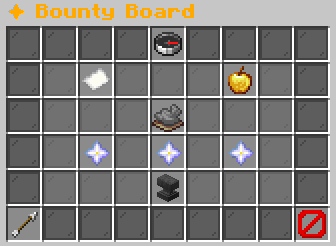
Available quests: 3Active limit: 1 questReset rule: expires with rotation
Rotation length: [in-game value] hoursExample state · bracketed values depend on your game.Legendary AscensionPermanent rarity path
Requirement: Epic family pet, level 100Reward: Legendary rarityAfter upgrade: Level 1 + tier XP boostNo Active Legendary QuestNo active Legendary quest.Choose one of the three Nether Stars.You can pick only one per rotation.Quest 1: [Family]Ascension Task[Quest description]
Pet Requirement• Family: [Family]• Rarity: Epic• Level: 100
Progress• Skill: [in-game value]• Task type: [in-game value]• Difficulty: [in-game value]• Progress: [in-game value] / [target]• Expires: [time remaining]
Click to activate (cannot cancel)Example state · bracketed values depend on your game.Quest 2: [Family]Ascension Task[Quest description]
Pet Requirement• Family: [Family]• Rarity: Epic• Level: 100
Progress• Skill: [in-game value]• Task type: [in-game value]• Difficulty: [in-game value]• Progress: [in-game value] / [target]• Expires: [time remaining]
Click to activate (cannot cancel)Example state · bracketed values depend on your game.Quest 3: [Family]Ascension Task[Quest description]
Pet Requirement• Family: [Family]• Rarity: Epic• Level: 100
Progress• Skill: [in-game value]• Task type: [in-game value]• Difficulty: [in-game value]• Progress: [in-game value] / [target]• Expires: [time remaining]
Click to activate (cannot cancel)Example state · bracketed values depend on your game.How Ascension Works1. Pick one quest from the Nether Stars.2. Keep the matching Epic pet active.3. Only that pet can gain progress.4. Finish before the timer ends.
Active quests cannot be cancelled.BackReturn to the previous menu.CloseClose this menu.
View the related in-game pictures and tooltips (1)
Related pictures and tooltips
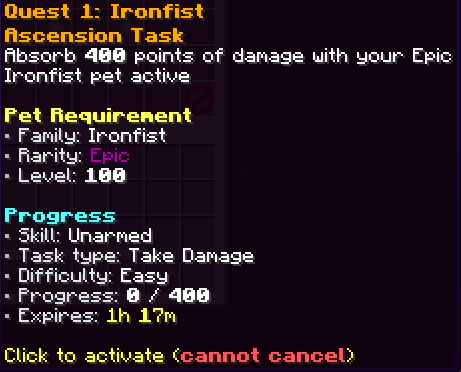
Pet Requirement• Family: [Family]• Rarity: Epic• Level: 100
Progress• Skill: [in-game value]• Task type: [in-game value]• Difficulty: [in-game value]• Progress: [in-game value] / [target]• Expires: [time remaining]
Click to activate (cannot cancel)Example state · bracketed values depend on your game.
Explore the button explanations
Menu picture
Illustrated control map. Item availability, labels and locked states can change in-game. Symbols identify actions; they are not exact item textures.
Choose a pictured button to read what it does. Use arrow keys to move between buttons. On a phone, scroll the picture sideways.
✦ Bounty Board
Top row: Bounty Board: Choose a Legendary quest.
Middle: Current Rotation: Read when the Legendary quest choices refresh. Legendary Ascension: Read Legendary Ascension. Active Legendary Quest: Read your chosen pet’s task and progress. Legendary quest: Choose a quest and read its confirmation. No Legendary Quests: Read No Legendary Quests. How Ascension Works: Read How Ascension Works.
Bottom row: Back: Return to the previous menu. Close: Close this menu.
Pictures
Available quests: 3Active limit: 1 questReset rule: expires with rotation
Rotation length: [in-game value] hoursExample state · bracketed values depend on your game.Legendary AscensionPermanent rarity path
Requirement: Epic family pet, level 100Reward: Legendary rarityAfter upgrade: Level 1 + tier XP boostNo Active Legendary QuestNo active Legendary quest.Choose one of the three Nether Stars.You can pick only one per rotation.Quest 1: [Family]Ascension Task[Quest description]
Pet Requirement• Family: [Family]• Rarity: Epic• Level: 100
Progress• Skill: [in-game value]• Task type: [in-game value]• Difficulty: [in-game value]• Progress: [in-game value] / [target]• Expires: [time remaining]
Click to activate (cannot cancel)Example state · bracketed values depend on your game.Quest 2: [Family]Ascension Task[Quest description]
Pet Requirement• Family: [Family]• Rarity: Epic• Level: 100
Progress• Skill: [in-game value]• Task type: [in-game value]• Difficulty: [in-game value]• Progress: [in-game value] / [target]• Expires: [time remaining]
Click to activate (cannot cancel)Example state · bracketed values depend on your game.Quest 3: [Family]Ascension Task[Quest description]
Pet Requirement• Family: [Family]• Rarity: Epic• Level: 100
Progress• Skill: [in-game value]• Task type: [in-game value]• Difficulty: [in-game value]• Progress: [in-game value] / [target]• Expires: [time remaining]
Click to activate (cannot cancel)Example state · bracketed values depend on your game.How Ascension Works1. Pick one quest from the Nether Stars.2. Keep the matching Epic pet active.3. Only that pet can gain progress.4. Finish before the timer ends.
Active quests cannot be cancelled.BackReturn to the previous menu.CloseClose this menu.
Pet Requirement• Family: [Family]• Rarity: Epic• Level: 100
Progress• Skill: [in-game value]• Task type: [in-game value]• Difficulty: [in-game value]• Progress: [in-game value] / [target]• Expires: [time remaining]
Click to activate (cannot cancel)Example state · bracketed values depend on your game.